
How to index your website in Google News?
Appearing in Google News and Google Discover delivers massive organic exposure and establishes exceptional brand credibility. Since Google eliminated manual application forms, inclusion has become algorithmic, governed by rigorous quality and transparency standards.
How do Google's algorithms evaluate editorial freshness, author authority, and publication standards? What technical configurations are essential to qualify?
This step-by-step guide outlines technical prerequisites, journalistic guidelines, structured data markup (NewsArticle), and setup in Google Publisher Center.
 Author: Thierry P. Gaillard -
 Where and in what formats does Google News display your content?
Your news-related content can appear in Google Search results in the form of text, images, or videos. The two primary placements in Google Search for news are the "Top Stories" section:
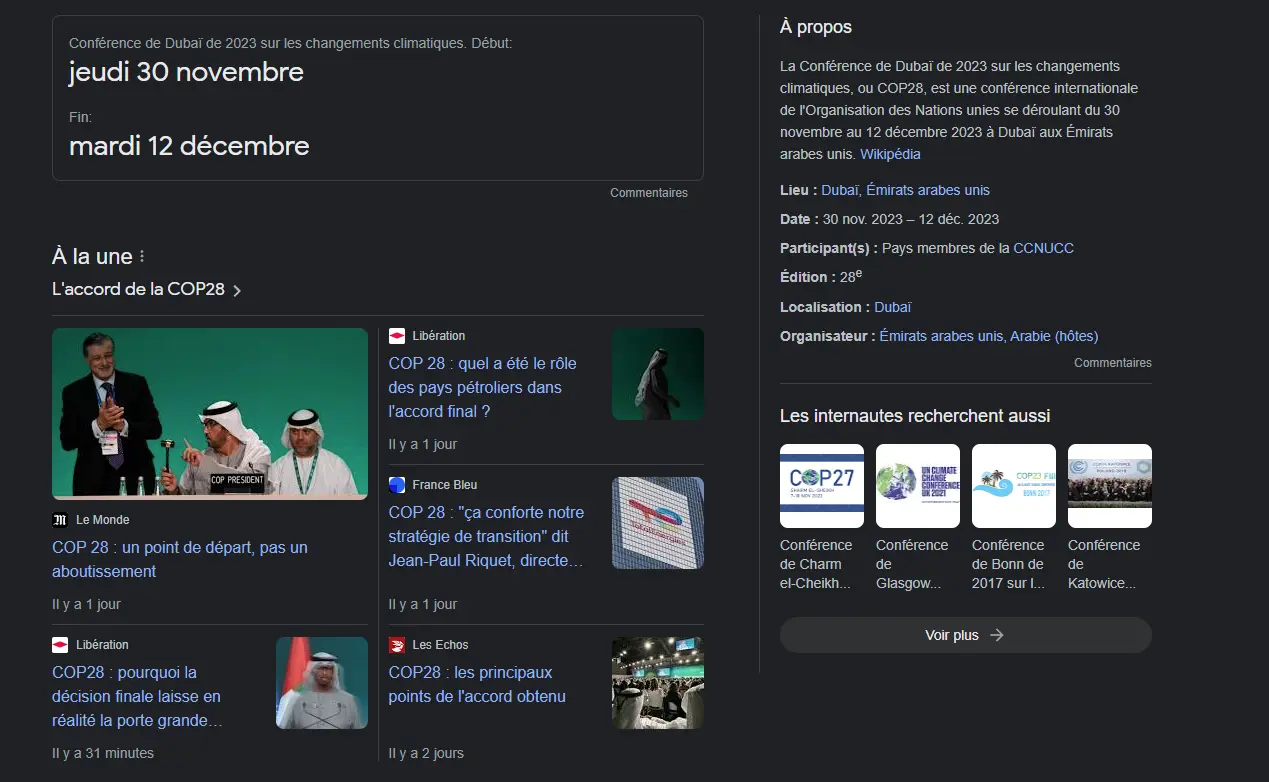
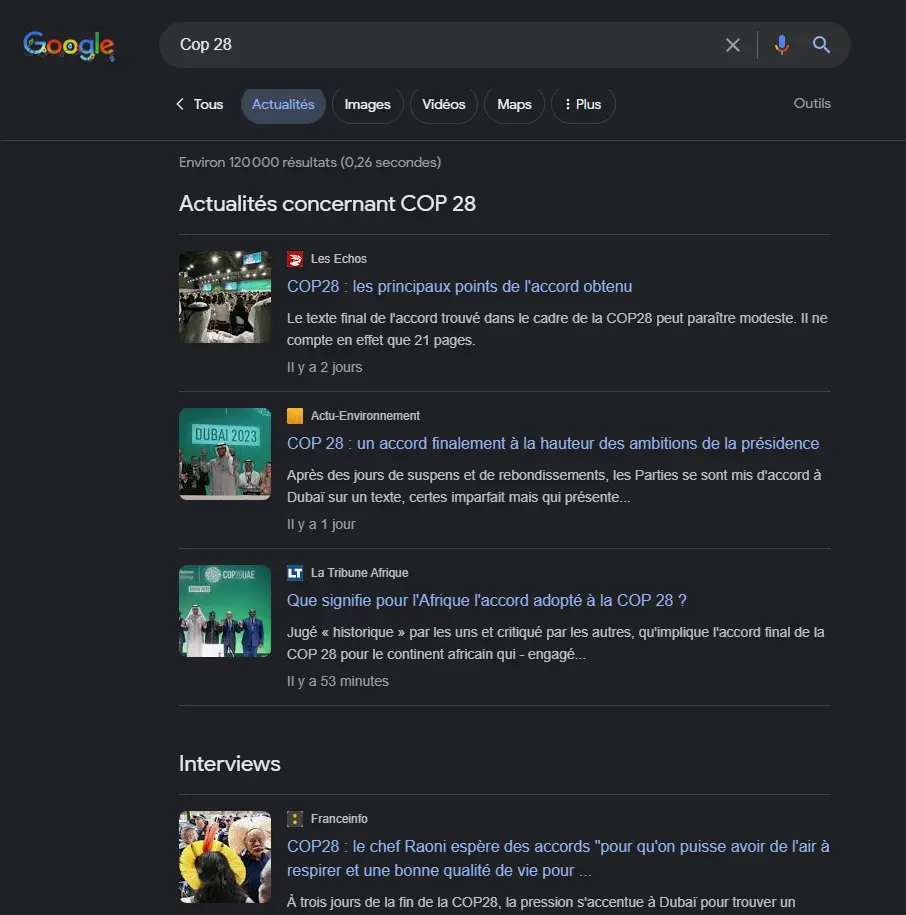
However, the content displayed in one placement differs from the content shown in the other.
How to become algorithmically eligible for Google News
To gain access to both features, your website must be eligible for Google News, a news aggregation service available on Android, iOS, and the web at news.google.com.
It must meet three fundamental requirements:
- A high level of E-E-A-T (Experience, Expertise, Authoritativeness, and Trustworthiness).
- A proven track record of consistent news publishing.
- Full compliance with Google News content and technical policies.

Building uncompromising editorial credibility and transparency
Making your website eligible for Google News is not enough on its own for your articles to be featured.
Experience, Expertise, Authoritativeness, and Trustworthiness (E-E-A-T) are crucial in how both Google and readers evaluate your website. Here is what each pillar entails:
- Experience. Proving that the content creator has direct, firsthand, real-world experience with the subject covered.
- Expertise. Demonstrating deep knowledge and professional skill in the topic being addressed.
- Authoritativeness. Both the content creator and the website must prove that they are a go-to reference source on the subject.
- Trustworthiness. This is the most essential pillar of E-E-A-T: even if you possess the first three qualities, if you do not inspire trust, you cannot claim to be a reliable source.
Google must trust both your website and the people producing its content. Credibility is the key to achieving results.
Producing high-quality original reporting and timely content
Beyond indispensable credibility, you must produce what Google calls high-quality content—that is, content designed to satisfy your human readers rather than search engines.
The Mountain View giant has published a checklist of self-assessment questions to verify whether your website offers helpful, reliable, people-first content. Use them without moderation.
It is also essential to include specific publication metadata that Google will verify:
- Display the initial publication date clearly labeled as "Published on".
- Add the update date labeled as "Last updated" whenever you make substantial changes.
- Use structured data to specify exact dates and time zones.
- Strictly avoid having other extraneous dates appear on the page.
- Provide up-to-date information about the authors, the publication, and the publisher, as well as clear contact details for the website or company.
Structuring your website and media assets for Google News
Alongside content quality, structuring your website properly is crucial to appear in the "Top Stories" section and the "News" tab. Two approaches work equally well for Google.
A single live-updated page for a developing news story
Some websites use a single page to cover the evolving developments of a news story (e.g., COP 28). In that case, I recommend following these guidelines:
- Include timestamps with the appropriate time zone.
- Follow Google's byline and dateline guidelines.
- Add a substantial volume of new information with each update.
This is clearly my preferred approach because it gives visitors immediate access to the latest version, avoids multiplying near-duplicate pages through paraphrasing, and simplifies website architecture. With each update, you add your new content above the previous entry, giving the reader the full chronological history.
Multiple dedicated pages for the same news event
Other websites choose to publish multiple separate pages for the same news event. Here are two key rules to follow:
- Interlink the related pages effectively.
- Include accurate dates and time zones on every page.
Images and videos in news content
Images play a vital role in Google News and Google Images. Follow these best practices:
- Use relevant, original images to illustrate your article.
- Crop and size your images so they are sufficiently large—at least 60 × 90 pixels (and ideally high-resolution for Discover/Top Stories).
- Avoid logos or oversized watermarks.
- Embed your images directly in the HTML code using standard
<img src="https://www.example.com/..." alt="...">tags. - Place your images close to the corresponding article headline.
- Use photographs without embedded text, and write descriptive captions and ALT attributes.
Keep advertising volume below editorial content
While monetizing your website through advertising is completely legitimate, it is vital to respect the rules below if you want to appear in Google News:
- Keep advertising volume strictly lower than your editorial news content.
- Clearly distinguish paid content placements (sponsored articles) from independent editorial content.
- Limit the size of pop-ups and ad banners that slow down page rendering and frustrate users.
- Use the
rel="sponsored"attribute for paid links that are advertisements or sponsored placements. - Mark links within user-generated content (comments, forum posts, etc.) with the
rel="ugc"attribute.
Leaving paid or user-generated links on your website without flagging them with the required attributes violates Google's spam policies and can result in exclusion from Google News.
Craft clear, compliant article headlines
- Place your main headline first inside an
<H1>tag. - Ensure that the page title inside the HTML
<title>tag matches the<H1>heading. - Verify that the anchor text pointing to your article from your pillar or category page matches the article's title.
- Avoid using the article's main headline or subheading as an active hyperlink.
- Never insert a date or time inside your article headline.
- Write article headlines containing at least 10 characters and between 2 and 22 words.
Implement article and newsarticle structured data
Structured data consists of standardized machine-readable metadata embedded in web pages. Search engines use it to better understand page content and deliver richer, more relevant search results.
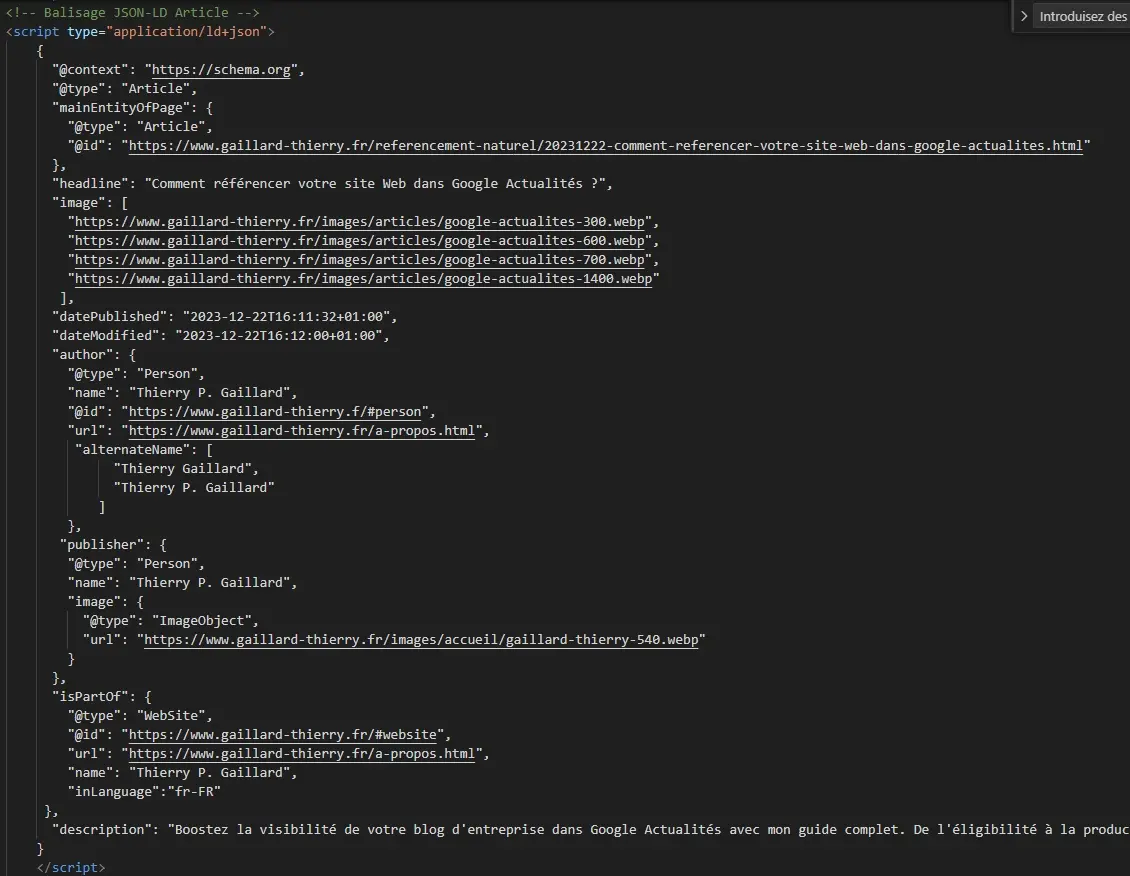
For Google News, I recommend using the "Article" or "NewsArticle" structured data schema with the following properties:
- datePublished: the date and time the article was first published, in ISO 8601 format.
- dateModified: the date and time the article was last modified, in ISO 8601 format.
- headline: the title of the article. Headlines should not exceed 110 characters.
- image: the URL of an image associated with the article. Only a marked-up image that directly belongs to the article should be specified.
- isAccessibleForFree: a boolean flag indicating free-to-read content versus paywalled content.
- author.url: a link to a page that uniquely identifies the article's author (such as the author's social media profile, "About" page, or bio page).
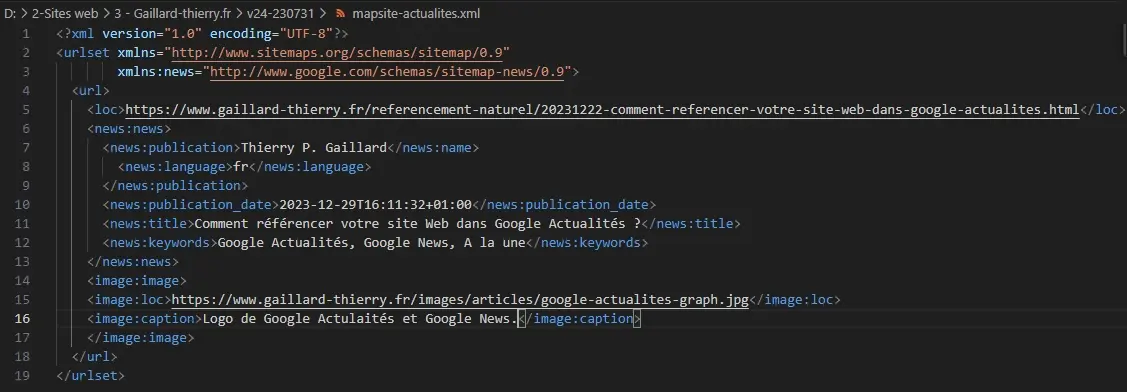
Create a dedicated Google News sitemap
Sitemaps are files that list all the pages of a website along with metadata such as last modification date, update frequency, and priority. Search engines use sitemaps to crawl and index websites more efficiently.
A Google News sitemap is an XML file that specifically provides metadata on news articles published on your website within the last 48 hours.
Specifically, a news sitemap contains the following elements:
- Article URL.
- Publication date.
- Language.
- Publication name.
- Article title.
This information helps search engines understand your news articles and rank them appropriately in search results.
A News sitemap is especially important for websites that publish news articles frequently. It enables search engines to discover and index breaking articles rapidly, boosting their visibility in search results.
Here are the concrete benefits of using a News sitemap:
- Improved visibility of news articles in search results.
- Faster discovery and indexing by search engine crawlers.
- Higher likelihood of articles being featured in Google News and Top Stories feeds.
To monitor and submit your sitemap updates, use Google Search Console.
Optimize access to paywalled and subscription content
If you have implemented a paywall, a paid login gate like many online newspapers, or a metered counter, you must use the appropriate structured data to let Google distinguish between free content and paid content. Failing to do so violates Google's cloaking and spam policies.
If you want content behind the paywall to be indexed, make sure it remains crawlable and indexable by Googlebot.
Configure Google Publisher Center
To help website publishers distribute their content in Google News, Google created the Publisher Center. This platform allows you to manage your publication branding in Google News and configure monetization solutions via Reader Revenue Manager.
While using Publisher Center is no longer mandatory—since publishers are now considered for the Google News index automatically—I still recommend configuring your publication profile to maximize your chances of success and customize your visual branding.
Conclusions
Every corporate blog has the opportunity to be featured in Google News. It is a phenomenal source of potential organic traffic and an effective way to build brand authority among audiences who do not yet know you.
However, achieving this requires sustained editorial investment, as you must publish original, timely content on a regular basis—with no guaranteed outcome.
If you are considering publishing content for Google News, carefully weigh your strategic objectives before committing.
And do not hesitate to contact me if you need assistance by clicking the button below.
Sources
- Google Publisher Center Help - Appear in Google News.
- Google Publisher Center Help - Appear in other Google News surfaces.
- Google Publisher Center Help - About the Publisher Center.
- Google Publisher Center Help - Best practices for your article pages.
- Google Search Central - SEO best practices for news sites.
- Google Search Central - English Google SEO Office Hours from December 2023.

About the author:
Thierry P. Gaillard - End-to-end digital project management
After working at American Express for 15 years—including six years as an IT project manager and eight years as a profit center director leading around a hundred people—Thierry P. Gaillard became a web entrepreneur, digital marketing manager, and e-commerce specialist.
His specialties include web performance, branding, business negotiation, and management.