What to do when your website is temporarily unavailable?

A sudden server crash, CMS database corruption, or major infrastructure migration can render your website inaccessible. Beyond immediate revenue loss, an outage mismanaged from an SEO perspective can cause Googlebot to de-index your most valuable pages within 48 to 72 hours.
Returning a generic 404 Not Found or a blank 200 OK maintenance page signals to search engines that your content is permanently gone. Instead, webmasters must explicitly instruct crawlers to come back later using HTTP 503 Service Unavailable.
This technical guide outlines immediate disaster recovery procedures, HTTP response code configurations (503 with Retry-After), and robots.txt dos and don'ts.
I will also explain what steps you need to take if your web pages remain unavailable for an extended period.
 Author: Thierry P. Gaillard - -
 Signal clearly to search engines that your site is temporarily down (HTTP 503)
Return an HTTP 503 Service Unavailable header for temporarily inaccessible web pages to clearly inform both your visitors and search engine crawlers. To do this, point all inaccessible URLs to your maintenance page. You have three implementation options:
Option A: use an .htaccess file if you are on an Apache server
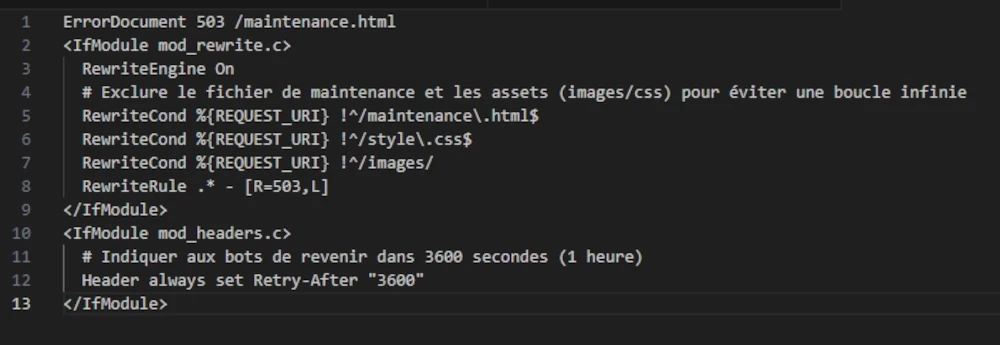
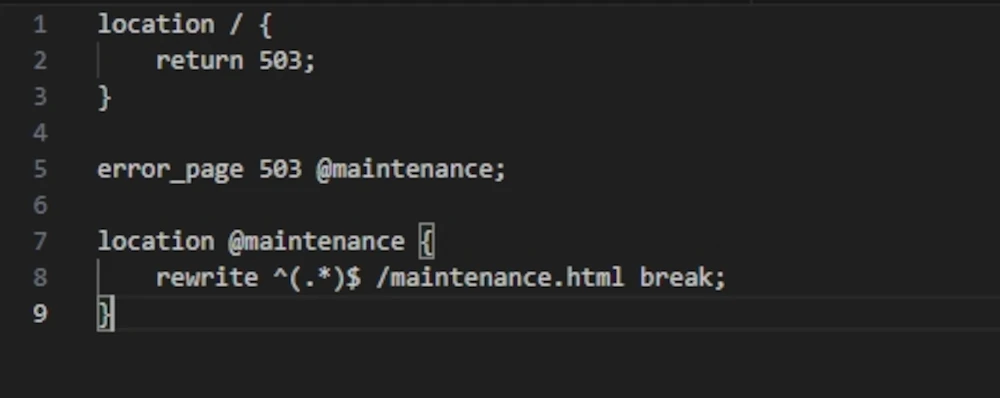
Option B: use an Nginx configuration file if you run this open-source server
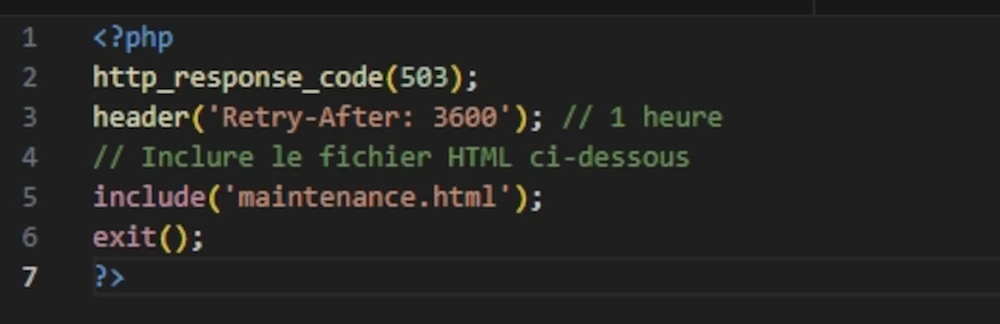
Option C: use PHP (at the top of index.php) if you operate at the application layer rather than the infrastructure layer
This is the preferred method in the following 3 scenarios:
1. You use shared hosting
On shared hosting plans such as OVH Perso/Pro or cPanel, you do not have direct access to server configuration files (nginx.conf or httpd.conf).
- You cannot restart the web server.
- Sometimes, .htaccess directives are restricted or improperly interpreted.
- PHP is the only reliable way to force an HTTP header before sending HTML output.
2. You are performing conditional maintenance
This is the most common use case. You want to close the website to public visitors while keeping access open for developers or administrators to test updates in production.
- Nginx/Apache can do this, but the syntax is cumbersome and often requires reloading the service.
- In PHP, it requires a simple
ifcondition.
3. You deploy without SSH access
If your deployment workflow relies strictly on FTP or Git without a CI/CD pipeline capable of modifying server configs, you can upload a temporary index.php file to cut public traffic instantaneously.
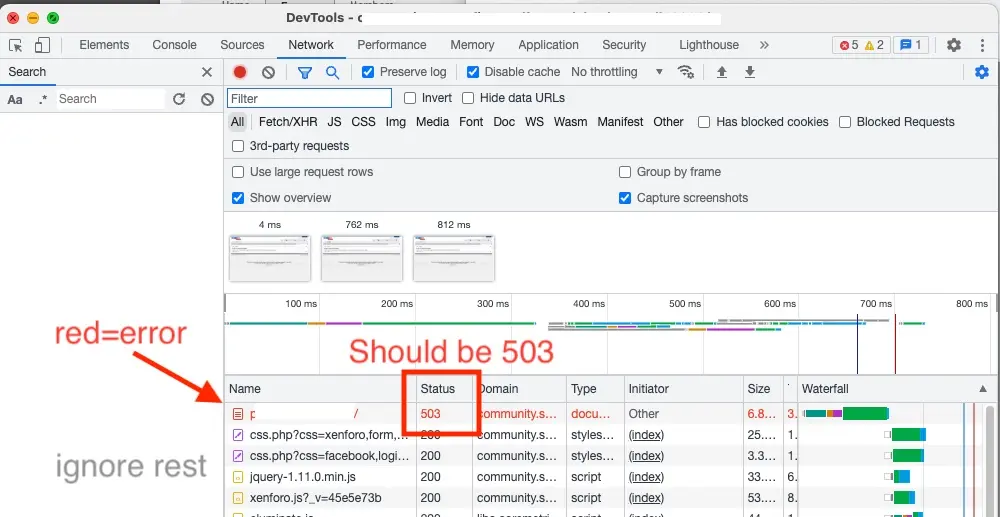
Verify in Google Chrome
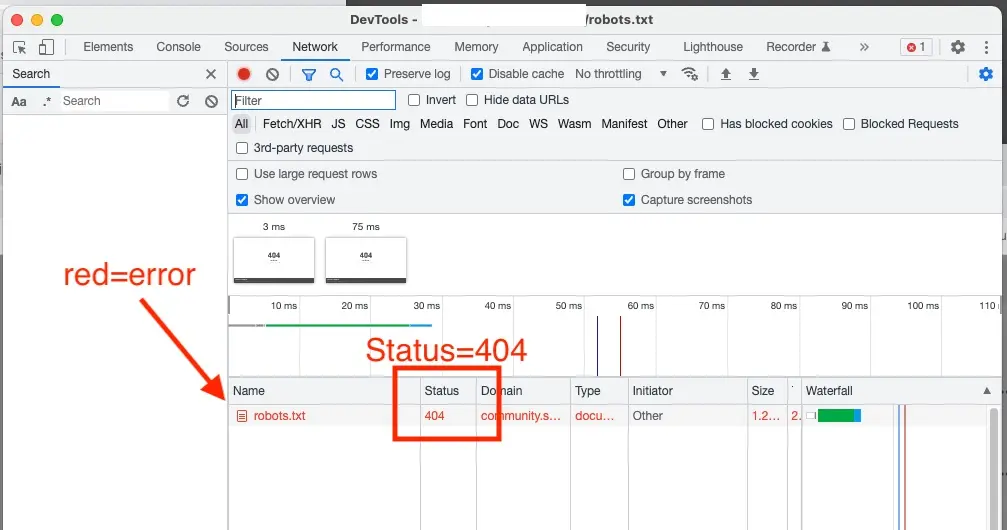
Verify in Chrome that the header is properly returned by right-clicking: Inspect, selecting the "Network" tab at the top, and refreshing the page. Finally, check the top entry: it should appear in red and display status code 503.
Do not block Googlebot in your robots.txt file during maintenance!
Make sure your robots.txt file returns either an HTTP 200 status code with an up-to-date robots.txt file, or an HTTP 404 status code. It must never return an HTTP 503 status code. Do not rely on how a 404 page looks visually in your browser—verify the actual HTTP header using Chrome DevTools.
The robots.txt file must return an HTTP 404 or HTTP 200 status code because if it returns an HTTP 503 code, search engine crawlers will assume the entire website is blocked from crawling for a prolonged period, which is a major SEO mistake.
Anticipate crawl budget and ranking consequences
If you own a website that displays "unavailable" when users try to reach it, you very likely have an issue with your server. Alternatively, you may want to intentionally take it offline for a few hours of scheduled maintenance.
In all cases, limit the duration of the HTTP 503 status code to a maximum of 24 hours whenever possible; beyond that threshold, you run a serious risk of seeing your pages de-indexed from search results.
Please note that taking a website offline, even for less than 24 hours, will have side effects: Googlebot will temporarily slow down its crawling rate on your site.
If your site only contains a few dozen pages, this will have negligible impact; however, if it contains several thousand pages, your crawl budget will drop, creating delays in ranking updates across search results.
If a website remains closed for more than 24 hours, there will inevitably be negative consequences in search engine results, regardless of the technical option chosen (503, blocked, noindex, 404, 403).
What to do if your web pages remain unavailable for extended periods?
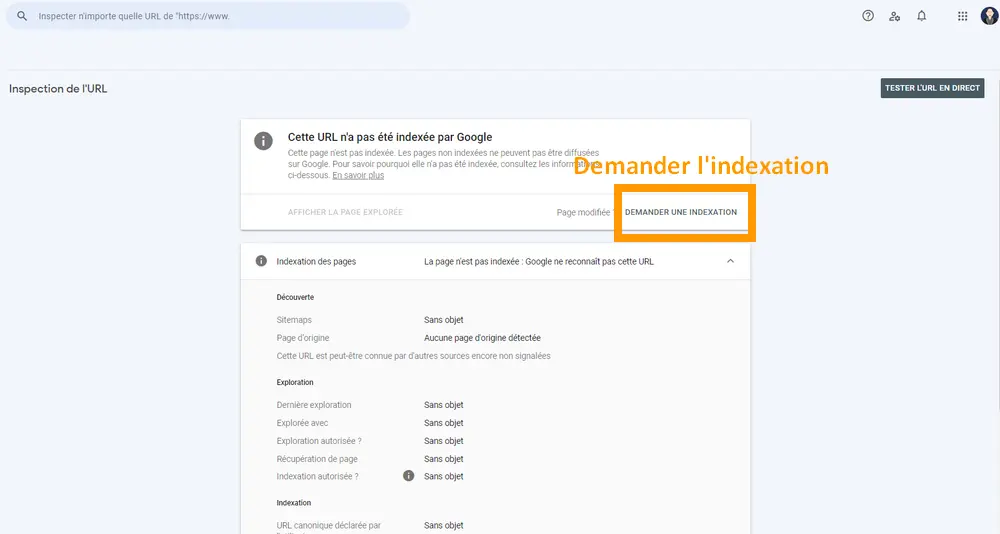
Check whether your critical pages are still indexed and, if not, resubmit them for indexing via Google Search Console if there are only a few, or via a sitemap file if you have a large volume. Focus on your top ten or twenty most important pages first, as Google typically re-indexes high-priority URLs quickly.
John Mueller notes that Google almost never indexes every single page of a website. It is therefore completely normal for a certain proportion of pages to remain unindexed.

About the author:
Thierry P. Gaillard - End-to-end digital project management
After working at American Express for 15 years—including six years as an IT Project Manager and eight years as Director of a 100-person profit center—Thierry P. Gaillard became a web entrepreneur, digital marketing manager, and e-commerce specialist.
His areas of expertise include web performance, branding, commercial negotiation, and management.